A few weeks ago, we launched Branching, giving you the ability to manage documentation in the same way you your manage code. With Branching, teams can edit, preview, and publish updates with confidence. Now, we’re building on that foundation with Branch Reviews.
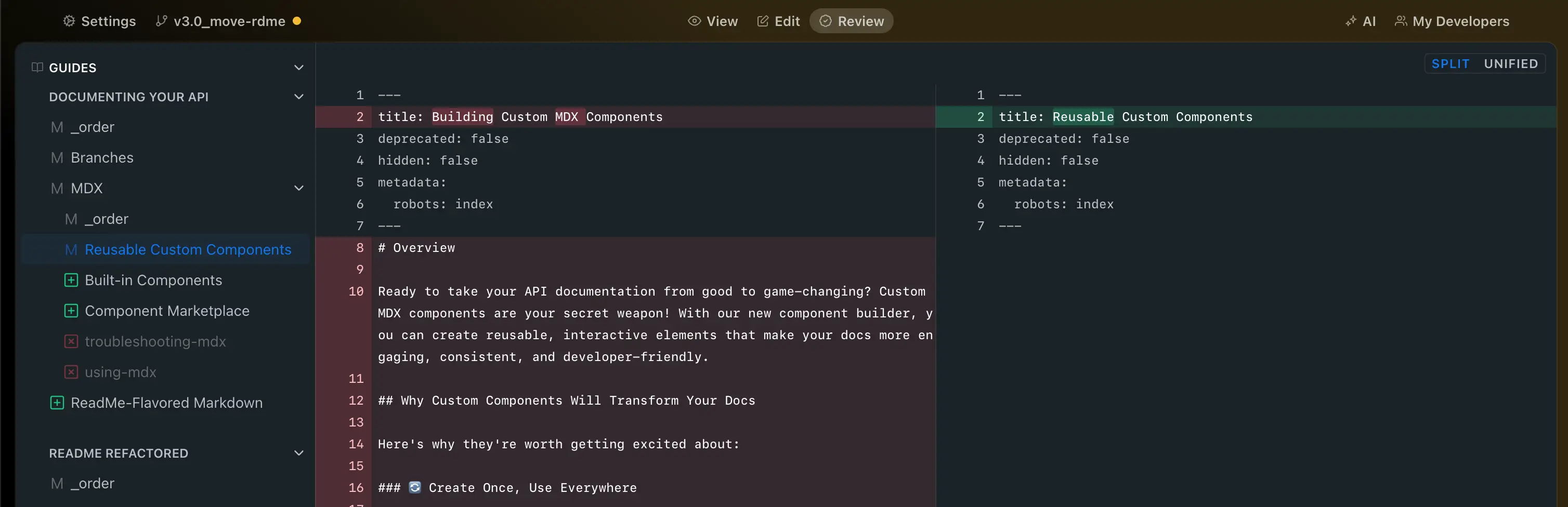
Branch Reviews provide a simple, structured way to see exactly what's changed on a branch, review in context, and approve edits before they go live. The result is a faster, safer, and more collaborative process for maintaining your API documentation.
Why Branch Reviews Matter
When you’re rolling out new features and products all the time, your API docs need to keep up. That’s how customers discover and adopt what you’ve built. The problem is, with multiple teammates editing docs from different places, it’s easy to lose track of changes or accidentally publish something that isn’t quite right.
Branch Reviews solve this by:
- Showing line-by-line diffs of every change across your docs
- Making it easy to preview updates before merging
- Letting teams share review links for quick feedback
- Supporting role-based merge permissions for governance (Enterprise feature)
How Branch Reviews Work
-
Create a Branch
Start from the Versions & Branches menu in your Admin Dashboard. Your changes live safely in a branch until you’re ready to merge. If you’re syncing with GitHub, branches created in the ReadMe UI will automatically show up in your GitHub repository too! -
Make Your Edits
Update pages, restructure content, or reorganize docs without affecting the live version. -
Open the Review Tab
See exactly what’s changed including content updates and documentation reordering. -
Share your Branch for Feedback
Share a preview link with teammates to review edits. -
Merge Only What's Ready
Once approved, merge your branch into production. If conflicts come up, resolve them in GitHub or choose which branch to keep. -
Control Who Merges
For Enterprise plans, you can restrict merging to Admins or Editors to ensure quality control.
Traditional Staging vs. Branching
Staging environments are slow, siloed, and often limited to one preview at a time. Branch Reviews are built for today’s collaborative teams:
| Staging | Branches |
|---|---|
| All project-level pending changes must be promoted together. | Individual branches can be merged when ready. |
| All teammates beholden to the same promotion cycle. | Each branch has its own preview, enabling targeted reviews and cleaner feedback workflows. |
| Only group Admins can promote content. | Flexible permissions so branches can be created, reviewed, and merged by different roles with granular control. |
| Limited team collaboration. | With GitHub sync, branches mirror seamlessly across ReadMe and GitHub. |
Getting Started with Branching
If your team wants to improve overall developer experience to drive API adoption, you need a documentation workflow that is collaborative, transparent, and safe.
Learn more about Branches in ReadMe and start reviewing and merging branches in your own workflow today.