Documentation that's easy to understand, intuitive to navigate, and informative is key to a strong developer experience. As documentation grows with more endpoints, guides, and contributors, keeping everything consistent becomes challenging to manage. Quality issues surface slowly through support tickets, reviews take longer, and writing styles morph as more people contribute to docs.
ReadMe’s Docs Audit helps teams understand and improve documentation quality across their entire docs site in one clear report.
What Is Docs Audit?
Docs Audit is a built-in ReadMe feature that analyzes your documentation using AI and a customizable style guide. Instead of reviewing pages one by one, Docs Audit evaluates your entire documentation hub and shows you how well its performing based on the rules you define. It answers important questions like:
- Which docs has the most errors and need immediate attention?
- Are there stale docs that need to be updated or removed?
- Which pages have inconsistent writing styles that could use a second look?
- Where are broken links that are causing developers to hit dead ends?
By turning documentation quality into measurable data, Docs Audit helps teams focus their time where it matters most.
How Docs Audit Works
Docs Audit is powered by ReadMe’s AI Linter and your custom style guide.
Custom Style Guides
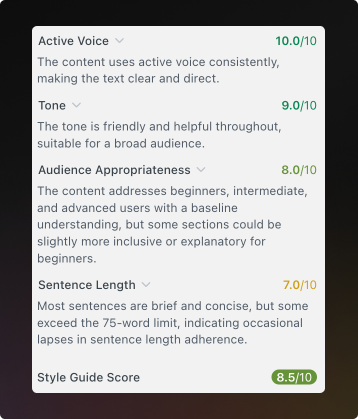
In order to run a Docs Audit, you'll need to define what good documentation looks like for your team in a custom style guide. Your style guide can include rules around tone, clarity, terminology, and structure. This ensures your docs match your brand guidelines and writing standards, even as more teammates publish docs.
AI Linter for Individual Pages
When you start writing docs in ReadMe, the AI Linter reviews the content as you edit. It flags things like unclear language, missing context, or style inconsistencies before you hit publish.
You can also apply rules for your code blocks to enforce formatting conventions and catch syntax errors. This helps teams improve quality at the page level while they are actively updating and editing docs.
Docs Audit for Your Entire Site
Docs Audit runs that same analysis across all your documentation pages. Instead of piecemeal feedback, you get an overview of documentation performance. Pages are scored, trends are surfaced, and recurring issues become easy to spot. This combination lets teams improve docs as they write and continuously refine docs over time.
Why Docs Audit Matters for API Documentation
Many teams still rely on manual reviews to maintain documentation quality. Often, that responsibility falls on a single person who owns the docs. This approach does not scale well, especially as APIs grow and contributions increase.
Docs Audit helps teams:
- Identify low-quality or outdated pages quickly
- Surface recurring issues across multiple docs
- Enforce shared standards for writing and structure
- Track and improve documentation quality over time
- Find and fix broken links
Using Docs Audit in Your Documentation Workflow
Docs Audit is designed to fit naturally into existing workflows. Teams often use it to:
- Prioritize which pages to update first
- Track improvements over time as docs evolve
- Align all documentation contributors around shared standards
- Set clear documentation goals across the organization
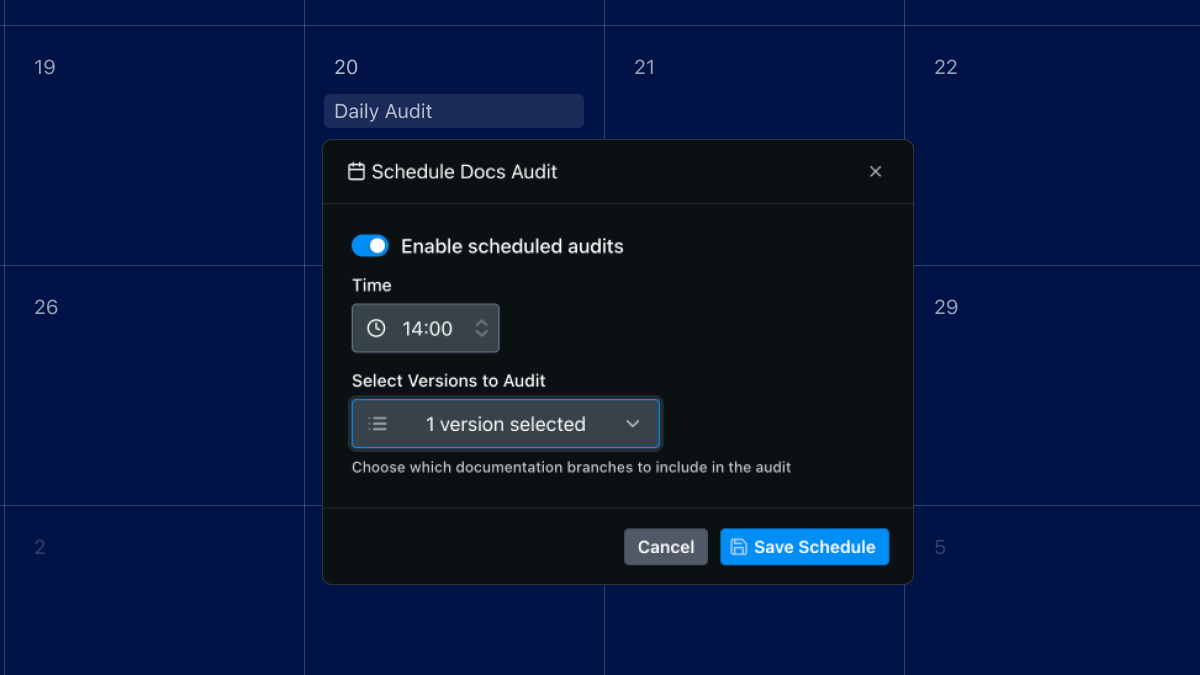
Teams on the Enterprise plan can use scheduled audits and exportable results, making it easier to monitor progress and share insights.
How Docs Audit Improves Developer Experience
Developers are more likely to trust and adopt APIs with clear, consistent documentation. Well-structured guides, consistent terminology, and complete explanations reduce friction and make it easier for developers to succeed. Docs Audit helps teams maintain that level of quality as documentation grows, ensuring every page supports a strong developer experience.
Get Started with Docs Audit in ReadMe
Docs Audit supports ReadMe’s mission to help teams create documentation developers actually want to use. By combining AI-driven insights with customizable rules, Docs Audit gives teams the tools to maintain clarity, consistency, and quality at scale. If your documentation is growing faster than your review process, Docs Audit is designed to help.
Start a free trial today and run your first Docs Audit to see where your documentation can improve.
Need help running you first Docs Audit?