Your API documentation is one of the first places developers go to learn how your product works. It shapes their first impression and plays a big role in whether they decide to build with your API. Clear, consistent, and accurate documentation is essential for a developer experience that helps developers hit 200. But keeping docs that way can be challenging, especially when many people are contributing.
At ReadMe, we treat documentation as a team sport. Designers, engineers, support teams, and go-to-market teams all play a part in keeping our docs up-to-date. Whether people write directly in ReadMe’s editor or review content in GitHub, multiple voices often mean a range of writing styles.
That’s where ReadMe’s Linter comes in. The AI Linter helps your team keep API docs cohesive and error-free by catching issues early, before your customers find them. With the Linter, you can:
- Define a custom style guide in plain language that matches your company’s tone and standards
- Set rules to detect objective errors before publishing
- Surface subjective warnings for content that might need a second look
- Automatically fix issues with Agent Owlbert, ReadMe’s AI writing assistant
The AI Linter acts as a built-in quality check for your API documentation. It helps your team write, edit, and publish faster while maintaining accuracy and consistency across every page.
How ReadMe's Linter Works
- You define rules for your style guide, errors, and warnings.
- A style guide sets clear, plain-language rules for your documentation, along with guidelines for identifying errors and warnings. Think of a style guide as documentation for your documentation.
- In software development, an error is something that breaks the code. If you apply this to docs, an error is anything that should never be published.
- A warning is less critical. It points out a potential issue that you may want to look over to make sure it fits your style.
- You can run the AI Linter on a page while editing, before you save.
- Agent Owlbert can help fix all the issues that are flagged.
Here are some examples of how style guide rules, errors, and warnings look in plain language—and how our AI Linter interprets them:
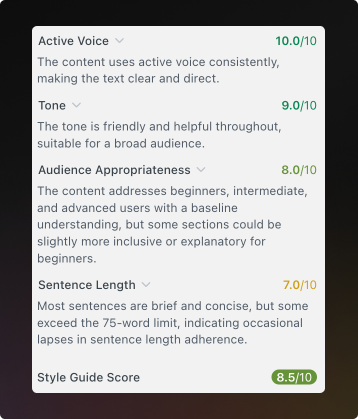
Style Guide:
- Use an active voice and maintain a friendly, helpful tone.
- Write for beginners, intermediate, and advanced users, but assume that everyone has a baseline understanding of the product.
- Keep sentences brief, between 50-75 words.
Errors:
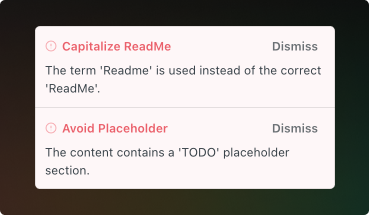
- Capitalize ReadMe correctly. Always use "ReadMe". Never use “readme” or “Readme."
- Avoid placeholder text including lorem ipsum or TODO.
- Use backticks for code elements.
Warnings:
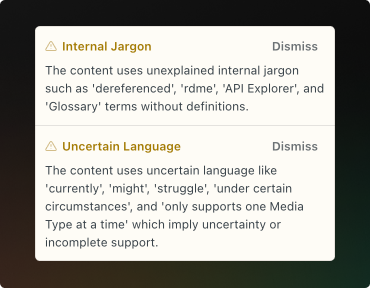
- Avoid using unexplained, internal jargon.
- Avoid using uncertain language.
- Use inclusive language.
Why Linters Matter for API Documentation
For many teams, documentation quality is a key part of the overall developer experience. When your docs stay up to date, developers can build with your API faster. ReadMe’s Linter automates much of the manual review process and makes it easy for your entire documentation site to stay unified and polished. Check out our docs and try our linter!
For Teams Looking to Get More From ReadMe AI
We're introducing the AI Booster Pack which gives your team more ways to get value from ReadMe AI, with features including:
- Ask AI: A conversational AI search tool that surfaces contextually relevant answers trained on your documentation.
- Ask AI Analytics: Dig into user questions, responses, and feedback to understand how Ask AI is performing.
- Unlimited AI Agent usage: A writing assistant that helps create and edit your docs.
- Unlimited Docs Audits: An overview report and score of your documentation site.
You can add AI Booster Pack to any plan for $150/month. If you're already using Owlbot, you’ve automatically been upgraded to the AI Booster Pack, which now includes Ask AI.
Need help getting started with the linter?