Good API documentation can make or break a developer's first impression of your product. No matter how well-designed your API is, if developers can't figure out how to use it, they'll move on.
The problem is that most teams treat documentation as an afterthought. It gets written after the code ships, updated inconsistently, and owned by no one in particular. By the time a developer hits a gap or finds a stale endpoint, the damage to their experience is already done.
This guide covers what great API documentation looks like and how to write, maintain, and scale it in practice.
TL;DR
- Great API documentation is complete, structured for scanning, and built around how developers actually work, not how your API was built.
- Keeping docs accurate means treating them like code: version-controlled, reviewed, and updated as part of every release.
- ReadMe gives documentation teams the tools to write, maintain, and scale their docs without sacrificing quality as their API grows.
What Is API Documentation?
API documentation is the reference material that explains how developers can integrate with your API. It covers the available endpoints, the parameters they accept, the responses they return, and how to handle authentication and errors.
Good API docs help developers get up and running with your API quickly, troubleshoot when something goes wrong, and understand your product well enough to build on it confidently.
What Are the Different Types of API Documentation?
Most APIs are complex enough that no single document can serve every reader or every need. Here are the main categories:
- Reference documentation covers the technical details of your API: endpoints, parameters, request and response formats, and status codes. This is the core of most API docs.
- Guides and tutorials walk developers through specific tasks or use cases, such as "How to authenticate," "How to send your first request," and so on. These are especially useful for developers who are new to your API.
- Changelogs track what's changed between versions. Developers rely on these to understand what's new, what's deprecated, and what might break their integration.
- Error reference documents your error codes and what they mean. The more human-readable your error messages, the less time developers spend guessing.
- SDKs and code samples aren't always thought of as documentation, but well-maintained SDKs and code examples reduce the friction between "reading about your API" and "using your API."
Each of these types of docs serves a different reader at a different moment. But having a page for every endpoint or error reference isn't the same as having good documentation. A reference entry that lists parameters without explaining edge cases doesn't help a developer implement anything. Neither does a guide that stops short of a working example, or a changelog that just says "bug fixes and improvements."
Having complete documentation matters, but only if each piece actually gives developers what they need to implement.
How Do You Write Great API Documentation?
Following API documentation best practices means starting with the fundamentals: clear structure, complete reference content, and examples that actually work. Here are other best practices to keep in mind:
Write for Your Audience, Not Your API
The biggest mistake API documentation teams make is describing the API from the inside out, starting with how it was built rather than how developers need to use it.
Before you write a single word, think about who's reading these materials. You're writing for people at various stages of their careers, with differing levels of knowledge.
The answers should shape your structure, your tone, and how much you explain. Not every reader will read every word. Write so that experienced developers can scan for what they need, while less experienced ones can still follow along.
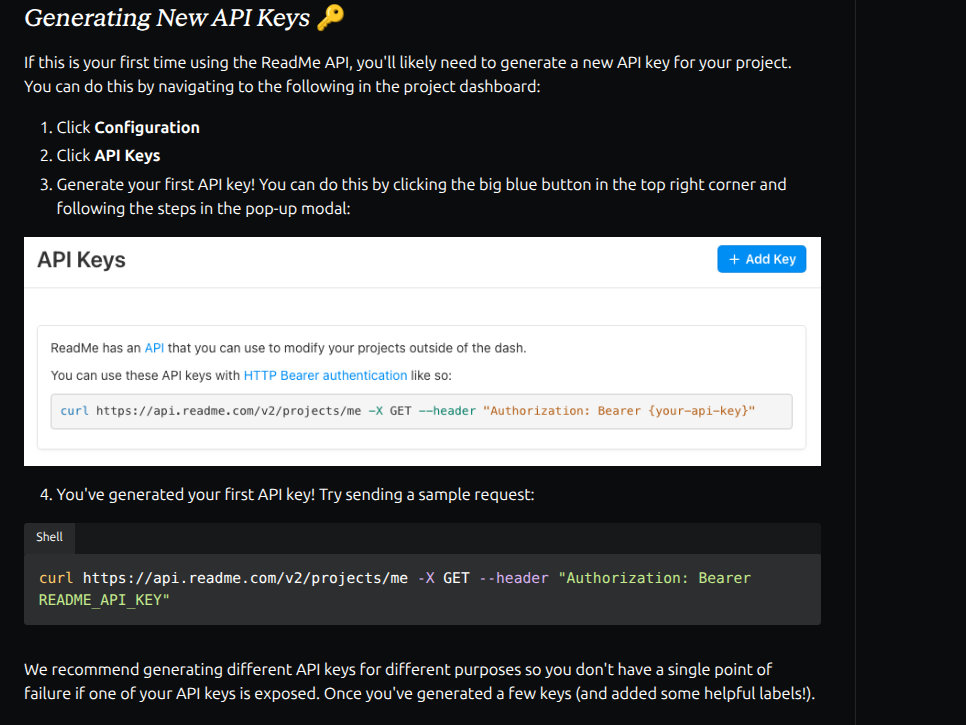
ReadMe's own authentication docs are a good example of this. A developer setting up their first API key gets a numbered walkthrough explaining the process, while an experienced developer can skip straight to the cURL command. The same page works for both without either having to read around the other.
Document Every Endpoint, Parameter, and Response
Don't assume anything is self-explanatory. Even if a parameter name seems obvious to you, document it anyway.
For each endpoint, include:
- What it does, in plain language
- Required and optional parameters, with types and acceptable values
- A full example request and response
- What errors it can return
This helps build trust. Developers who encounter gaps in your docs start to wonder what else is missing.
Give Authentication and Error Handling Their Own Sections
Authentication trips up more developers than almost anything else. Token expiration, OAuth flows, API key placement, and scope configuration all vary between APIs, and getting any one of them wrong means your requests won't work. Don't bury authentication details inside a general overview. Give it its own section, with step-by-step instructions and examples.
The same goes for error handling. If your error messages are human-readable and documented clearly, including what caused the error and how to fix it, you dramatically reduce support load and developer frustration.
A good error response tells developers what went wrong, why it went wrong, and what to do next. Document all of it: the status code, a machine-readable error code, a plain-language message explaining exactly what happened, and a link to further documentation. A developer who hits a well-documented error doesn't need to file a support ticket or dig through your docs. The response tells them what happened and where to go next.
Include Working Examples in Multiple Languages
Examples are where the "aha" moments happen. Developers often learn by doing, and a concrete, working code example is worth more than paragraphs of explanation. Include examples for every major use case, and in as many languages as your developers actually build in: JavaScript, Python, Ruby, curl, and so on.
One easy way to achieve this is with ReadMe's automatic examples feature. Rather than maintaining separate code samples for every language by hand, developers can make real API calls directly from your docs and generate working code snippets in 20+ languages automatically.
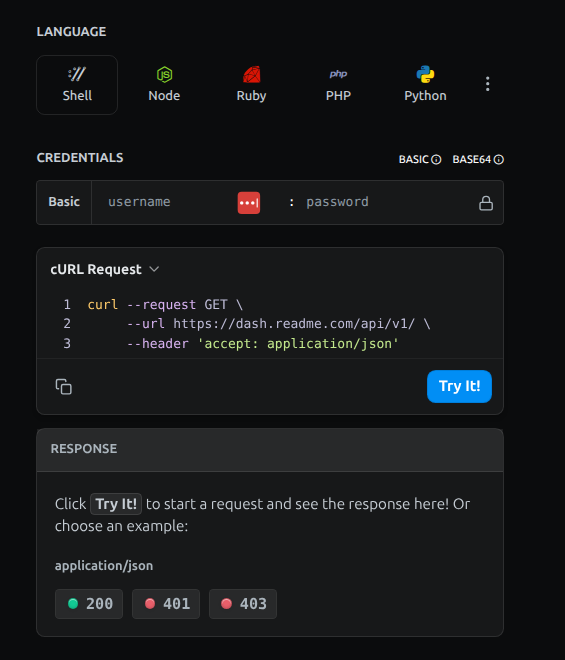
This means your examples are always current, runnable, and in the language your readers are actually using.
Structure for Scannability
Developers don't read documentation like a book. They scan for what they need, jump to the relevant section, read it, and then leave. Structure your docs accordingly.
Here are the essentials for a modern API documentation layout:
- Multi-column layout. Stripe popularized the three-column layout: navigation on the left, content in the middle, code examples on the right. It works because it lets developers see examples in context, so it's easier to understand how the endpoints work in the real world.
- Persistent navigation. A navigation bar that disappears when you scroll is one of the most frustrating things in developer documentation. Keep it visible, so it's easy to jump around.
- Syntax highlighting. This is a small detail that developers appreciate. Improve the readability of your sample code so that it's easier to scan and process the different components.
- Tabs for language examples. Let developers filter to the coding language they're using.
Getting these details right from the start saves you from retrofitting structure into docs that have already been published and indexed. ReadMe provides this structure for you right out of the box.
Keep a Changelog
A changelog is one of the most underrated parts of API documentation. Developers who rely on your API need to know when something changes, and they shouldn't have to dig for it.
Document every release: new features, bug fixes, deprecations, and breaking changes. Be specific. "Improved performance" tells developers nothing. "Reduced response time for /search by 40% by adding an index on created_at" is much more useful.
A well-maintained changelog also builds trust. It signals that your team takes documentation seriously and communicates changes proactively.
How Do You Keep API Documentation Up to Date?
If your docs don't reflect your current API, developers can't trust them. And if they can't trust your docs, they'll struggle to trust your product.
Build Documentation Into Your Release Process
Many developer teams make the mistake of either waiting until after launch to update documentation or slapping together a few new params and calling it a day. When multiple people start contributing to one big body of documentation, it's difficult to get everyone to adhere to the same quality standard.
Two concrete processes make a real difference here. First, add a documentation review as a required step in your pull request checklist. Second, assign a documentation owner for each team or product area, so there's always someone accountable for keeping that section current. And before any launch, have someone QA your API using only the documentation. If they get stuck, your docs aren't good enough yet.
Keep Your Docs in Sync With Your Codebase
The further your documentation lives from your code, the faster it gets out of date. A docs-as-code approach (storing your docs in version control alongside your code) helps keep them in sync and makes it easier for developers to contribute.
ReadMe supports two practical paths for this:
GitHub AI Writer triggers AI-assisted documentation updates when your code changes. When a pull request is merged, it can surface documentation that may need updating, so nothing slips through the cracks. Learn more about GitHub AI Writer.
ReadMe's MCP Server connects your API docs directly to AI coding assistants. Developers using tools like Claude or Cursor can query your API docs without leaving their editor. Learn more about ReadMe's MCP Server.
Use Analytics to Understand What Developers Actually Need
You might think you know which parts of your API are most important, but your analytics will tell you if you're right.
Tracking which endpoints get called most, which documentation pages get the most traffic, and where developers drop off tells you where to focus your documentation efforts. The most-used endpoints deserve the most thorough documentation.
ReadMe's My Developers feature takes this further, giving you visibility into how specific developers use your API and docs, so you can identify friction points and prioritize improvements that actually matter to the people building with your product.
Audit for Deprecated Content
Outdated docs that still describe deprecated endpoints or old parameter formats cause real confusion. Set a quarterly cadence to review your docs and pull anything that no longer applies.
ReadMe's Docs Audit automates a lot of this work, scanning your documentation for gaps, inconsistencies, and content that may need attention. It's a faster way to keep a handle on documentation quality across a large or fast-moving doc set.
Make It Easy for Developers to Give Feedback
Developers will find ways to use your API that you never anticipated, and they'll hit problems you didn't know existed. Make it easy for them to tell you about it by ensuring your docs have built-in features that make giving feedback easy.
This includes:
- Thumbs up/thumbs down: Gives developers the option to give very quick feedback on individual pages.
- Inline comments: Lets developers flag issues directly on the page where they encounter them.
- GitHub links: Takes developers to a GitHub issue where they can report problems without leaving your docs.
- Communities or forums: Creates a space for async support and surfaces recurring questions you may not have documented yet.
With these mechanisms in place, gaps and errors that would slip past any internal review process get caught by the developers actually using your API.
ReadMe's Suggest in GitHub feature lets developers propose edits to your documentation directly via GitHub pull requests. It lowers the barrier for contributions and keeps your docs improving continuously.
How Do You Scale Your API Documentation?
As your API grows, keeping documentation accurate and complete gets harder. Here's how to scale without sacrificing quality.
Use AI to Write and Maintain Docs Faster
AI doesn't replace good documentation judgment, but it does reduce the time it takes to act on it.
ReadMe's AI features are built into the documentation workflow. AI Agent can draft and rewrite docs for clarity, suggest improvements, and implement changes directly. The AI Linter checks your content against your style guide in real time, surfacing issues as you write. And Docs Audit gives you a complete picture of your documentation health, so you know where to focus.
Together, they make it possible for a small documentation team to maintain a high bar across a large docs site.
Make Your Docs Work for AI Agents, Not Just Human Readers
Developers use AI coding assistants to learn how to use an API. If your docs aren't structured for LLMs to consume, you're invisible to a growing share of your potential users.
That means thinking about how your content is structured, how it's exposed to AI tools, and whether it's available in formats like LLMs.txt that AI assistants can actually use. ReadMe's guide to making your docs AI-ready covers how to approach this in practice.
How ReadMe Helps You Build and Maintain Better API Documentation
ReadMe is built specifically for API documentation teams. It covers the full documentation lifecycle: writing, reviewing, publishing, maintaining, and improving.
ReadMe gives teams the tools to build documentation that actually works for developers: Agent Owlbert for AI-assisted writing, the AI Linter for real-time quality checks, Docs Audit for documentation health monitoring, and My Developers for insight into how people are actually using your API. ReadMe can help you consolidate scattered docs, eliminate stale content, and build a maintenance workflow that keeps pace with your API.
Sign up for ReadMe or talk to our team about what a better documentation experience looks like for you.
FAQs
Quick answers to common questions about API documentation best practices.
What should API documentation include?
At minimum, API documentation should include an overview of the API, authentication instructions, documentation for every endpoint (including parameters and responses), working code examples, an error reference, and a changelog. Guides and tutorials are valuable additions for complex APIs.
How often should you update API documentation?
Update the API documentation every time your API changes. Build documentation updates into your release process so they happen alongside feature launches. A regular audit (quarterly is a good starting point) helps catch deprecated content, missing examples, undocumented error codes, and endpoints that have changed but whose docs haven't.
What's the difference between API documentation and an API reference?
An API reference is the technical specification: endpoints, parameters, and request/response formats. API documentation is broader and includes the reference, plus guides, tutorials, examples, and anything else that helps developers use your API effectively.
What is docs-as-code?
Docs-as-code is an approach where documentation lives in version control alongside your codebase, following the same workflows as your code: pull requests, code review, and automated checks. It keeps docs in sync with code and makes it easier for developers to contribute.
How can AI help with API documentation?
AI can help with drafting, rewriting for clarity, checking against a style guide, and identifying gaps or outdated content. The key is keeping humans in the loop. AI works best as a writing and review assistant, not a replacement for documentation judgment.
What makes developer documentation hard to maintain?
Developer documentation is hard to maintain because it's almost always treated as secondary to the code itself. Docs live in a separate system from the codebase, ownership is unclear, updates get deprioritized after launch, and there's no reliable feedback loop to surface errors before developers hit them.