
Today, we're rolling out a redesigned ReadMe, built around how docs get written and read in the AI era. Writers can collaborate with AI without giving up the final word, and the docs you ship work just as well for the people reading them as for the agents your customers are building with. We rebuilt our homepage to show how it all fits together. Write from our editor, your IDE, or the CLI. Your customers just see great docs.
Here's what you can start using today:
- A completely redesigned admin experience, which puts everything you need to build and edit docs right where you expect them to be
- A flexible, AI-native editor that lets you mix Markdown with MDX/JSX and keeps you as the final editor in the loop
- A CLI tool that works with AI to lint your docs and keep your OpenAPI spec in sync
- An AI Writer that watches your GitHub pull requests for code changes and suggests updates to your docs automatically
Redesigned Admin Interface
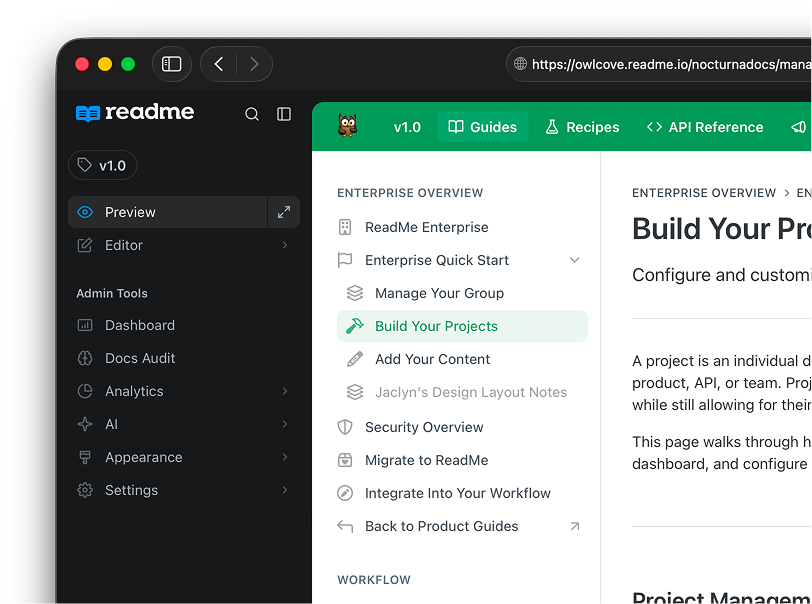
All our tools in a simple-to-use sidebar
About a year ago, we did a redesign where we combined the hubs (the outward-facing sites your customers see) and the dash (the admin panel used for editing), to make it easy to jump between edit and view mode. Most of the admin features lived in the bar at the top. Since then, we've added a lot: AI agent, branching, docs audit, branch reviews, MCP servers, and more. The thin top bar became too overloaded, and often-used features were hidden away.
So, we're launching a redesign. We moved everything into a single sidebar, which is where all the management features now live. We reorganized settings, too, so things should be easier to find and access.
There's also a full preview mode, so you can see your docs exactly as your customers do, with no admin UI in the way. Check out our docs for what's new and how to navigate the editor.
We did a lot of user testing, and everyone has a much easier time navigating. That being said, we know we didn't get it perfect on the first try, so if you have any feedback please reach out!
New Editor
Markdown meets MDX with an inline AI
We rebuilt our editor from the ground up! While it mostly looks the same, it will feel a lot better. We switched the underlying editor engine (from Slate to Tiptap, for anyone curious). It's a much nicer experience, handles MDX better, and now the editor matches the output a lot closer than before.
It's also closely tied to our new rendering engine, MDX-ish. It's a combination of MDX and Markdown, so you won't have to remember pedantic MDX syntax anymore if you're writing code. You can learn more in our blog post, Introducing MDX-ish.
Lastly, we've brought AI right into the editor. Before, you could make changes to content from the AI sidebar. Now, if you highlight text, you can use AI to preview and apply the changes without leaving the editor.
For self-serve plans, the editor is available now as a one-click upgrade. Because it also changes the underlying rendering engine, we wanted to make sure you were in control. For enterprise, reach out to your CSM or support, and we can turn it on for you. We'll also manually go through all your docs to confirm everything looks great!
AI Writer
Sync GitHub code changes to your docs
Keeping docs in sync with code just got easier. When your team pushes code changes, ReadMe's AI Writer creates a branch with suggested doc updates for you to review and merge. Your docs stay current with product development without the manual chase.
The ReadMe CLI tool
Write docs in your terminal... or let AI do it for you!
You've always been able to write docs in our WYSIWYG editor or your IDE. You can also write right from the terminal using BiDi Sync, and we wanted to make sure that was a delightful experience too.
We built a CLI tool which helps make sure you've formatted your docs properly. It checks for broken links, duplicate slugs, invalid frontmatter, and broken MDX components. It can automatically fix most issues, and for the harder ones you can use Claude or Codex to finish the job.
The CLI tool complements your local AI workflows, too. It's built to be used by AI, so it can help Claude or Codex understand how to write ReadMe-formatted documentation from your computer.
Start Writing Docs From Anywhere
If you're reading this blog post, that means you've already seen our homepage got a glow-up! Check out our new sidebar, editor, CLI tool, MDX-ish renderer, and AI Writer, and let us know what you think!
Happy writing!
Documentation Changes Added
setting-up-custom-domainActions